



Digital Certification and Electronic Signatures
An electronic signature is a set of electronic data attached to a digital document (such as an invoice) that primarily serves two functions:
- Identifying the signatory: It unequivocally proves who issued or signed the document.
- Guaranteeing integrity: It ensures that the document's content has not been altered or modified in any way after signing. It acts as a kind of digital seal.
To create such a signature with full legal validity, an Electronic or Digital Certificate is required.
A digital certificate is an electronic file issued by an accredited Certification Authority (CA) that contains:
- The holder's identity: full name and national identity document (DNI/NIF) for individuals, or name and tax identification number (CIF) for legal entities.
- The holder's public key: the public half of their cryptographic key pair.
- The issuing CA's identity: the entity that guarantees the authenticity of the identity-key link.
- The validity period: the certificate's start and expiration dates.
- The certificate's unique serial number.
- The CA's digital signature: the cryptographic guarantee that the certificate has not been altered.
The universal technical standard for digital certificates is X.509, developed by the ITU-T (Telecommunication Standardization Sector) and adopted by all public key infrastructure (PKI) systems.
Certificate format: PEM, DER, PFX/P12
Digital certificates are distributed in different formats depending on their use:
- PEM - Privacy Enhanced Mail (.pem, .crt, .cer, and .key): Base64 format, a very common container for digital certificates and keys used by Apache servers and web applications. They can contain public certificates, private keys, or both.
- DER - Distinguished Encoding Rules (.der, .cer): binary format, used in Java environments and some embedded systems.
- PFX/P12 (.pfx, .p12): PKCS#12 format, includes the certificate + private key in a password-protected file. It is the standard format for distributing certificates to end users who must install it in their browser or upload it to a signing platform. It usually contains several elements:
- Public certificate: includes the holder's public key.
- Private key: Password-protected, necessary for authentication and digital signing.
- Intermediate and root certificates: These help validate the public certificate's chain of trust.
The two file extensions (.p12 and .pfx) correspond to the same format, PKCS#12, also known as PFX. This is the most widely used format for exchanging certificates and private keys.
.p12 and .pfx files are virtually identical and interchangeable. You can change the extension, and the resulting file should work.
Operation or Functioning
The digital certificate works based on asymmetric cryptography, public-key cryptography, or PKI:
Each certificate holder possesses two mathematically related keys (key pair):
- Private key: known only to the holder. It is used to create the signature. It should never be shared with anyone.
- Public key: freely distributable, included in the certificate. It is used to verify the signature.
Signing Process:
Verification Process:
Types of Certificates valid for Electronic Signatures.
Individual Certificate (or Citizen Certificate)
Identifies a specific individual. It contains their name, surname, and national identity card or passport number. This is the common type for professionals who sign documents on their own behalf.
In Spain, the DNIe (Electronic National Identity Document) is a certificate for individuals issued by the National Police.
The FNMT (National Mint and Stamp Factory) also issues certificates for individuals, among other accredited providers.
Certificate of Legal Entity Representative
This identifies an individual in their capacity as the legal representative of a company or organization. It contains both the individual's details and those of the company they represent.
Legal Entity Certificate (Company Seal)
This identifies exclusively the legal entity (company or organization). It does not identify any specific individual. It is used for the organization's electronic seal authenticating the institutional origin of documents issued on behalf of the company.

Digital Certificate Storage:
In the browser or operating system
The private key is stored in the browser's certificate store (Chrome, Firefox) or the operating system's certificate store (Windows Certificate Store, macOS Keychain, GNU/Linux system certificate stores, etc.). This is the most accessible option but also the least secure: if the computer is compromised, the private key can be stolen.
On a smart card or USB token
The private key is generated and stored within the device's cryptographic chip and never leaves it. The signature is created within the chip: the computer sends the hash to the device, and the device returns the signature. If the device meets the Qualified Signature Creation Device (QSCD) standards of the eIDAS Regulation, it can be used to generate qualified electronic signatures.
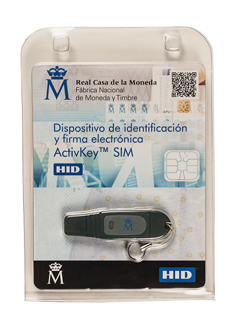
In Spain, the electronic ID card (DNIe) is the most widely used smart card. USB tokens from the FNMT (Spanish National Mint) are also common, among other providers.
In the cloud (HSM — Hardware Security Module)
The private key is stored in an HSM (Hardware Security Module) managed by the trusted provider. The owner authenticates with the provider (using a PIN, OTP, or biometrics) to authorize each use of their key. This method, called remote signing, allows the use of a qualified certificate from any device, without the need for a physical card or card reader.
Qualified HSM remote signing allows you to generate qualified electronic signatures (the highest level of eIDAS) from any device and location.
Examples of 'cloud HSM' are: Google Cloud HSM, AWS CloudHSM, Azure Managed HSM....
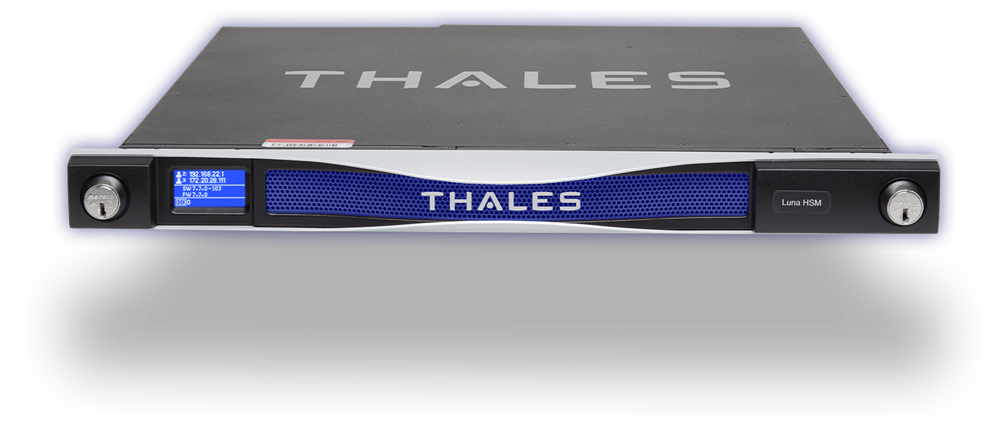
The THALES Luna Network HSM model is a physical deployment type (on-premise). It is a hardware device that is installed and managed in the organization's own data center.